
Easy Conversion Interface
Smart Converter for Languages & Code
Languages Supported
Convert languages and code in one click with ToolsGoo! Our smart Advanced Language & Code Converter Tool works as an AI Code Converter, a reliable programming code converter, and a fast online text translator, made for students, bloggers, and developers.
Try for free!Free toolkit without signup








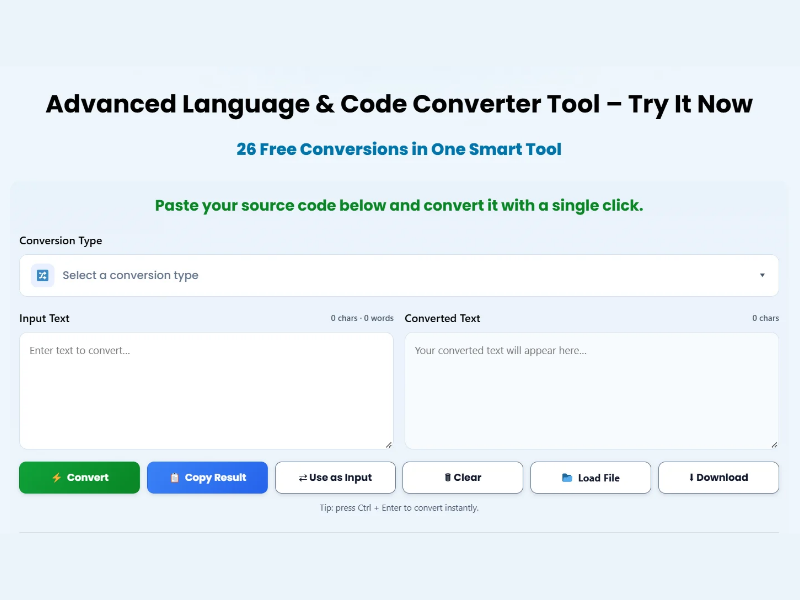
Advanced Language & Code Converter Tool – Try It Now
26 Free Conversions in One Smart Tool
Paste your source code below and convert it with a single click.
Tip: press Ctrl + Enter to convert instantly.
Share this useful tool with others:
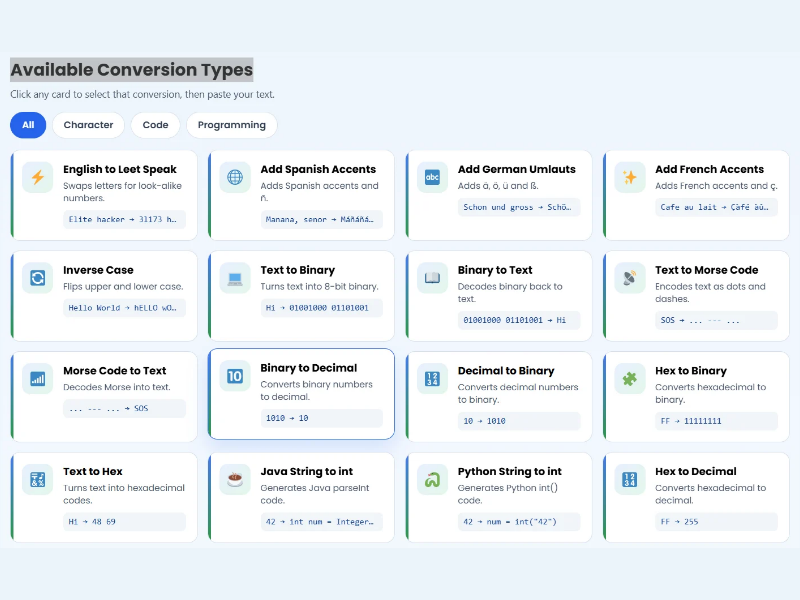
Available Conversion Types
Click any card to select that conversion, then paste your text.
Page Summary & Index
Jump straight to the section you need. Tap any point below.
Convert Languages, Accents & Code in One Click
Typing a Spanish ñ, decoding binary or turning 0.75 into a fraction should take seconds, not a hunt through five different websites. The ToolsGoo Advanced Language & Code Converter Tool puts 26 free conversions on one clean screen, so students, bloggers, developers and content creators can finish the job and move on.
Pick a conversion, paste your text and click Convert. The result appears instantly, ready to copy, download or send back into the tool for another round. There is no signup and nothing to install, and it works smoothly on phones, tablets and computers.
Here is what you get in one place:
Language Characters:
Add Spanish accents, German umlauts and French accents, or tap the built-in special keyboard to type ñ, ä, ß, ç and more.
Code and Number Tools:
A fast binary translator, a Morse code translator with audio playback, text to hex, and binary, decimal and hex conversions.
Programming Helpers:
ASCII codes, decimal to fraction, and ready-to-copy Java, JavaScript and Python string-to-int and int-to-string code.
Whether you are learning a new language, writing code, hiding a message in Morse or finishing a math task, this converter tool gives you a clean, accurate result in a single click.
Convert text and code in one click and see the result instantly.
Accents, binary, Morse code, hex, ASCII, fractions and code helpers in one place.

Simple & Fast:
Our tool converts text and code in just one click.
All-in-One:
From language translation to binary and Morse code, you get everything in one place.
100% Free:
No payment and no signup. Use every conversion as often as you like.
User-Friendly:
A clean design with a tap-to-type special keyboard that works on any device.
How to Use the Converter in 4 Simple Steps
How to Use This Tool

Select a type:
Open the Conversion Type menu, search for what you need, or tap any card below the tool.
Enter your text:
Type or paste it, or use Load File to upload a .txt file.
Click Convert:
You can also press Ctrl + Enter for an instant result.
Copy or download:
Use Copy Result, Download, or Use as Input to run another conversion on the result.
Quick Tips
-
For Spanish, German and French, tap the special keyboard keys to place accents exactly where a word needs them.
-
For binary to text, separate each 8-bit group with a space.
-
For Morse code, click Play Morse to hear the beeps.
-
To convert many numbers at once, put each value on a new line or separate them with spaces.
Binary Translator: Text to Binary and Back
Computers speak in 0s and 1s, and this binary translator lets you speak it too. Type a word, click Convert, and every character becomes an 8-bit binary number. Paste binary into the tool and it turns it back into readable text.
It works as a simple binary code translator and binary language translator for homework, coding practice, puzzles or secret messages. You can also move between number systems without a calculator.
Binary Conversions
| Conversion | Example input | Result |
|---|---|---|
| Text to Binary | Hi | 01001000 01101001 |
| Binary to Text | 01001000 01101001 | Hi |
| Binary to Decimal | 1010 | 10 |
| Decimal to Binary | 10 | 1010 |
| Hex to Binary | FF | 11111111 |
For binary to text, put a space between each 8-bit group. For the number conversions, paste several values separated by spaces and convert them all at once.
Spanish, German & French Accents with a Special Keyboard
No more copying letters from other websites or memorising Alt codes. Choose Add Spanish Accents, Add German Umlauts or Add French Accents and a special keyboard appears right under the text boxes. Tap a key and the letter lands exactly where your cursor is.
Spanish
(and capitals)
German
(and capitals)
French
(and capitals)
There are two ways to work:
Tap the Keys:
Place each accent exactly where a real word needs it. This is the best way to write correct Spanish, German or French.
Click Convert:
Apply accents to every matching letter in one go. This quick mode is handy for styling text, testing fonts or creating fun effects.
The special keyboard is a big help for anyone studying Spanish, practising French or typing German on a keyboard without umlauts. Remember that this tool adds accents and special characters; it does not translate whole sentences from one language to another.
Morse Code Translator with Audio
Turn any message into dots and dashes, then hear it as real Morse beeps. This Morse code translator works in both directions: Text to Morse Code encodes letters, numbers and common punctuation, and Morse Code to Text decodes dots and dashes back into words.
When you select a Morse option, a Play Morse button appears. Click it to hear your message as short and long beeps, and click Stop whenever you like. It is a fun way to learn the Morse alphabet, practise for a scouting activity or send a hidden message to a friend.
Morse Code Conversions
| Conversion | Example input | Result |
|---|---|---|
| Text to Morse Code | SOS | ... --- ... |
| Morse Code to Text | ... --- ... | SOS |
Letters are separated by a space and words by a slash (/). Think of it as a simple Morse alphabet translator and Morse code audio converter that turns your text into sound. It plays Morse you type or convert here; it does not listen to a recording and decode it.
Hex, Decimal, ASCII Code & Decimal to Fraction
Switching between number formats is something developers, students and designers do every day. Instead of opening a calculator or searching for a chart, convert hex, decimal and ASCII code values here in one click.
Hex, Decimal & ASCII Conversions
| Conversion | Example input | Result |
|---|---|---|
| Hex to Decimal | FF | 255 |
| Decimal to Hex | 255 | 0xFF |
| Text to Hex | Hi | 48 69 |
| String to ASCII Codes | Hi | 72 105 |
| ASCII Codes to String | 72 105 | Hi |
| ASCII Codes to Binary | 72 105 | 01001000 01101001 |
| ASCII Codes to Hex | 72 105 | 48 69 |
Converting decimals to fractions
Homework, recipes, measurements and woodworking all need fractions at some point. Decimal to Fraction turns 0.75 into 3/4 and 1.25 into 5/4 (shown with the mixed number 1 1/4). Fraction to Decimal does the reverse, so 3/4 becomes 0.75 and 1 1/4 becomes 1.25.
Enter one number per line to convert a whole list at once.
Java, JavaScript & Python String Converters
Converting a string to an integer is one of the first things every programmer learns, and one of the most repeated. Enter a number, pick your language, and the tool writes the code line for you, ready to copy into your editor or IDE.
String Conversion Snippets
| Conversion | Example input | Code you get |
|---|---|---|
| Java String to int | 42 | int num = Integer.parseInt("42"); |
| JavaScript String to int | 42 | let num = parseInt("42", 10); |
| Python String to int | 42 | num = int("42") |
| Java int to String | 42 | String str = String.valueOf(42); |
| Python int to String | 42 | text = str(42) |
These helpers are perfect for students learning Java, JavaScript or Python, and for developers who want a quick, correct snippet without checking the docs. The tool generates the code; it does not run it, so paste the line into your own project or IDE.
Supported Conversions
Fast & Accurate Conversions
Want to see which languages are widely supported online? Check Google's official list of supported languages.
Use our Code Converter Tool and Language Translator on ToolsGoo for seamless conversions.
Our tool supports a wide range of conversions, including:

Languages:
Spanish, German and French accents and special characters, with a tap-to-type keyboard.
Code Utilities:
Binary, Morse code with audio, hex and ASCII conversions, plus Java, JavaScript and Python string code.
Data Types:
Decimal to fraction, fraction to decimal, and binary, decimal and hex numbers.
Why Everyone Needs This Tool?

One Simple Tool for Every Kind of Conversion:
One tool, 26 conversions, no signup and no cost. The ToolsGoo Advanced Language & Code Converter Tool puts every small converter on one fast, clean page that works on every device.Students, coders and writers get the same simple experience, with nothing to install and instant results in your browser.
Try the converter now and finish your next conversion in one click.
For Students:
Learning Spanish, German or French? Type accents correctly with the special keyboard and check binary, ASCII and fraction homework fast.
For Coders:
Generate Java, JavaScript and Python string-to-int code and convert hex, binary and ASCII values in seconds.
For Content Creators:
Create Morse messages with audio, hacker-style Leet speak and unique text effects.
For Daily Tasks:
From decimals to fractions to hex codes, finish small conversions without a calculator.
Benefits of Using Our Tool

In today's fast-paced digital world, developers, students, and content creators often need quick and accurate ways to translate text and convert code formats.
- A fast, unified solution for text, numbers and code.
- Accurate results for every number, code and accent conversion.
- No software to install and no signup.
Why Our Utility Stands Out

Unlike other complex software, this online utility focuses on speed, simplicity, and complete accessibility for all users.
- Convert binary, Morse code, hex and ASCII instantly.
- Get ready-to-copy Java, JavaScript and Python code.
- Fully optimised for mobile, tablet and desktop browsers.
Key Features of the ToolsGoo Advanced Language & Code Converter
Accents Keyboard for Spanish, German & French
Choose Spanish accents, German umlauts or French accents and tap the keys on a special keyboard. The letter lands exactly where your cursor is.
Binary Translator
Turn text into 8-bit binary and back into readable text. You can also move between binary, decimal and hex without a calculator.
Morse Code with Audio
Convert text to Morse code and back, then click Play Morse to hear your message as short and long beeps.
Hex, Decimal & ASCII Codes
Convert hex, decimal and ASCII code values in one click. Paste several values separated by spaces and convert them all at once.
Decimal to Fraction
Turn 0.75 into 3/4, or 3/4 back into 0.75. Enter one number per line to convert a whole list at once.
Java, JavaScript & Python Snippets
Enter a number, pick your language, and the tool writes the string to int or int to string code line, ready to copy into your editor or IDE.
Works in Both Directions
Most conversions run both ways, so you can encode and decode with the same tool without switching pages.
Many Converters in One Place
Language, number and code converters live together on one page, so you do not need a different website for every small task.
SUPPORT DESK
Frequently Asked Questions
Is this tool free?
Yes, the Advanced Language and Code Converter available on ToolsGoo is 100% free for all users. You can use all its features without paying anything or creating an account.
Can I use this tool on mobile phones and tablets?
Yes, our website is fully responsive and optimized for all devices. Whether you are using a smartphone, tablet, or desktop computer, you will get a smooth and seamless user experience.
Do I need to register or create an account to use this tool?
No, you do not need to register or create an account. You can use the Advanced Language and Code Converter on ToolsGoo instantly and completely free without any sign-up process.
Is my data safe?
Yes. Your text is processed in your browser, so it is not sent to our server.
Which programming languages and formats are supported?
Our tool supports many code formats and utilities. You can generate Java, JavaScript and Python string-to-int code (plus Java and Python int-to-string), and convert binary, Morse code, hex, decimal, ASCII and decimal to fraction. For languages, it adds Spanish, German and French accents. The tool writes the code line for you; it does not run code.
Can I translate between human languages too?
Not at the moment. Our tool adds accents and special characters for Spanish, German and French, and includes a tap-to-type special keyboard, but it does not translate sentences from one language to another.
How does the Advanced Language and Code Converter work?
Select a conversion type, paste your text, binary numbers or other values into the box, and click Convert. This Code Converter Tool applies the conversion instantly in your browser, and you can then copy the result, download it or use it as the input for another conversion.
Is there any limit on converting text or code on ToolsGoo?
No, there are no limitations or restrictions. You can use our Advanced Language and Code Converter on ToolsGoo to perform as many conversions as you need, completely free of charge.
How do I add Spanish accents (á, é, í, ó, ú, ñ) to my text?
Select "Add Spanish Accents", paste your text, and click Convert. The tool replaces vowels and n with accented versions (á, é, í, ó, ú, ñ). Because correct Spanish accents depend on the word, use the special keyboard that appears below the text boxes (with á é í ó ú ü ñ ¿ ¡) to tap the exact letter you need.
Is there a special keyboard for Spanish, German and French letters?
Yes. When you select Add Spanish Accents, Add German Umlauts or Add French Accents, a special keyboard appears under the text boxes. Tap any key (for example ñ, ä, ö, ü, ß, é, ç or œ) and it is inserted into your text at the cursor. It works on phones, tablets and computers.
Can I type German umlauts (ä, ö, ü, ß) with this tool?
Yes. Choose "Add German Umlauts", paste your text, and click Convert, or tap the keys on the special keyboard to insert ä, ö, ü and ß exactly where you want them. Then copy the text and use it anywhere.
How do I add French accents and the ç letter?
Select "Add French Accents" and convert your text, or use the special keyboard for à, â, ç, é, è, ê, ë, î, ï, ô, œ, ù, û, ü and ÿ. You do not need to remember any keyboard shortcuts.
How do I convert text to binary, and binary back to text?
Choose "Text to Binary" to turn every character into an 8-bit binary number, with a space between each character. To go back, choose "Binary to Text" and paste your 0s and 1s with a space between each 8-bit group. This works as a quick online binary translator for text.
How do I convert binary, decimal and hexadecimal numbers?
Use these options for number conversions:
Binary to Decimal: 1010 becomes 10
Decimal to Binary: 10 becomes 1010
Hex to Binary: FF becomes 11111111
Hex to Decimal: FF becomes 255
Decimal to Hex: 255 becomes 0xFF
You can paste several numbers separated by spaces to convert them all at once (for the Binary to Decimal, Decimal to Binary and Hex to Binary options).
How does the Morse code converter work?
Use "Text to Morse Code" to turn letters, numbers and common punctuation into dots and dashes. Letters are separated by a space and words by a slash (/). Use "Morse Code to Text" to decode it back.
Can I listen to Morse code as sound?
Yes. When you select a Morse code option, a "Play Morse" button appears. Click it to hear your Morse code as short and long beeps, and click "Stop" at any time to stop the sound. Make sure your device volume is on.
What is Leet Speak and how do I use the English to Leet Speak option?
Leet Speak replaces letters with look-alike numbers, for example E becomes 3 and S becomes 5. Select "English to Leet Speak", paste your text, and click Convert to get a stylish "hacker-style" result for usernames, gaming names or fun messages.
Can I convert text to hexadecimal and ASCII codes?
Yes. "Text to Hex" turns text into hexadecimal codes (Hi becomes 48 69), and "String to ASCII Codes" lists the ASCII code of every character (Hi becomes 72 105). To go the other way, use "ASCII Codes to String". You can also turn ASCII codes into binary or hexadecimal with "ASCII Codes to Binary" and "ASCII Codes to Hex".
How do I convert a decimal to a fraction, or a fraction to a decimal?
Choose "Decimal to Fraction" and enter a number like 0.75 to get 3/4 (a result like 1.25 shows 5/4 and the mixed number 1 1/4). Choose "Fraction to Decimal" and enter 3/4 or a mixed fraction like 1 1/4 to get the decimal value. You can enter one number per line to convert several at once.
How do I convert a string to an int in Java, Python and JavaScript?
Select "Java String to int", "Python String to int" or "JavaScript String to int", enter your number, and the tool generates a ready-to-use line of code (Integer.parseInt in Java, int() in Python and parseInt in JavaScript). You can copy the line into your own project or code editor.
How do I convert an int to a string in Java and Python?
Select "Java int to String" or "Python int to String", enter a whole number such as 42, and click Convert. You get the code line String.valueOf(42) for Java or str(42) for Python, ready to copy.
Can I upload a text file or download my result?
Yes. Use the Load File button to upload a .txt file, then copy the result or download it as a text file. You can also press Ctrl + Enter to convert instantly, and use the "Use as Input" button to convert a result again.